Chia sẻ - Windows 11 Enterprise G 24H2 build 26100.268 (re-contruction) | Page 64 | VN-Zoom | Cộng đồng Chia Sẻ Kiến Thức Công Nghệ và Phần Mềm Máy Tính

Adblocker detected! Please consider reading this notice.

We've detected that you are using AdBlock Plus or some other adblocking software which is preventing the page from fully loading.

We need money to operate the site, and almost all of it comes from our online advertising.

Please add vn-z.vn to your ad blocking whitelist or disable your adblocking software. 

All the knowledge we share is completely free. If you are willing, please support us here.

×

Chia sẻ Windows 11 Enterprise G 24H2 build 26100.268 (re-contruction)

2012mshs

Rìu Chiến Chấm
Vâng ạ.
1. Bác nên hiểu là FBConan chọn version nào, và TẮT ốp đếch: là đã tính toán thiệt hơn.
2. Không có gì là hoàn hảo 100% khi vừa muốn nhỏ nhẹ, nhưng phải mới nhất ạ.
3. Bác thử xem có bản lite nào có version mới nhất: nhưng dung lượng chiếm dụng ở ổ cứng NHỎ HƠN của bản này????
Muốn nhỏ gọn hơn thì sau khi ốp > dọn dẹp > nén dạng lzx! Mức chiếm dung lượng sẽ giảm rất nhiều (có thể ít hơn cả bản gốc). Hạn chế cập nhật vì một một số tùy chỉnh sau khi cập nhật sẽ được khôi phục lại ban đầu!
 

PhuocNGO

Rìu Vàng
Muốn nhỏ gọn hơn thì sau khi ốp > dọn dẹp > nén dạng lzx! Mức chiếm dung lượng sẽ giảm rất nhiều (có thể ít hơn cả bản gốc). Hạn chế cập nhật vì một một số tùy chỉnh sau khi cập nhật sẽ được khôi phục lại ban đầu!
Tôi làm y chang bạn nói, giảm dc hơn 10gb system và app !
code file dk.
P/s chán update thường xuyên, trừ khi có lỗi nặng))
 

Attachments

  • Compact.txt
    635 bytes · Lượt xem: 13

nho nguoi

Rìu Chiến Bạc
Inbox gói xây dựng vào vùng kín
bác có thể tự xây dựng bằng tool của bác
nhưng có lưu ý do từ ver 27xxx nó bắt xác minh chữ ký số nên sau khi mount file wim phải add thêm file reg
và vấn đề backup and rename licenses của bác sẽ bị lỗi menu chuột phải,do vậy em copy nguyên licenses của enterG 26100,bác nghiên cứu rồi viết lại tool nhé
Mã:
rem == mount install.wim ==
dism /mount-wim /wimfile:install.wim /index:1 /mountdir:mount

rem == Packages ==
mkdir mount\Windows\servicing\Packages
copy /y mum\Microsoft-Windows-EnterpriseGEdition~31bf3856ad364e35~amd64~~10.0.27975.1.cat mount\Windows\servicing\Packages
copy /y mum\Microsoft-Windows-EnterpriseGEdition~31bf3856ad364e35~amd64~~10.0.27975.1.mum mount\Windows\servicing\Packages

pause

rem == Packages registry ==
Reg.exe load HKLM\SOFTHIVE mount\Windows\System32\config\SOFTWARE
Reg.exe add "HKLM\SOFTHIVE\Microsoft\Windows\CurrentVersion\Component Based Servicing\Packages\Microsoft-Windows-EnterpriseGEdition~31bf3856ad364e35~amd64~~10.0.27975.1" /v "InstallName" /t REG_SZ /d "Microsoft-Windows-EnterpriseGEdition~31bf3856ad364e35~amd64~~10.0.27975.1.mum" /f
Reg.exe add "HKLM\SOFTHIVE\Microsoft\Windows\CurrentVersion\Component Based Servicing\Packages\Microsoft-Windows-EnterpriseGEdition~31bf3856ad364e35~amd64~~10.0.27975.1" /v "CurrentState" /t REG_DWORD /d "64" /f
Reg.exe unload HKLM\SOFTHIVE

rem == backup and rename licenses folders ==
xcopy /S /E /I /H /R /Y /J mount\Windows\System32\en-US\Licenses temp\Licenses
ren temp\Licenses\_Default\Core EnterpriseG
ren temp\Licenses\OEM\Core EnterpriseG
ren temp\Licenses\Volume\Core EnterpriseG
copy /y mount\Windows\System32\OEMDefaultAssociations.xml .
copy /y mount\Windows\System32\OEMDefaultAssociations.dll .

rem == install enterpriseG and remove Core edition ==
dism /image:mount /apply-unattend:1.xml
dism /image:mount /apply-unattend:2.xml
 

2012mshs

Rìu Chiến Chấm
bác có thể tự xây dựng bằng tool của bác
nhưng có lưu ý do từ ver 27xxx nó bắt xác minh chữ ký số nên sau khi mount file wim phải add thêm file reg
và vấn đề backup and rename licenses của bác sẽ bị lỗi menu chuột phải,do vậy em copy nguyên licenses của enterG 26100,bác nghiên cứu rồi viết lại tool nhé
Mã:
rem == mount install.wim ==
dism /mount-wim /wimfile:install.wim /index:1 /mountdir:mount

rem == Packages ==
mkdir mount\Windows\servicing\Packages
copy /y mum\Microsoft-Windows-EnterpriseGEdition~31bf3856ad364e35~amd64~~10.0.27975.1.cat mount\Windows\servicing\Packages
copy /y mum\Microsoft-Windows-EnterpriseGEdition~31bf3856ad364e35~amd64~~10.0.27975.1.mum mount\Windows\servicing\Packages

pause

rem == Packages registry ==
Reg.exe load HKLM\SOFTHIVE mount\Windows\System32\config\SOFTWARE
Reg.exe add "HKLM\SOFTHIVE\Microsoft\Windows\CurrentVersion\Component Based Servicing\Packages\Microsoft-Windows-EnterpriseGEdition~31bf3856ad364e35~amd64~~10.0.27975.1" /v "InstallName" /t REG_SZ /d "Microsoft-Windows-EnterpriseGEdition~31bf3856ad364e35~amd64~~10.0.27975.1.mum" /f
Reg.exe add "HKLM\SOFTHIVE\Microsoft\Windows\CurrentVersion\Component Based Servicing\Packages\Microsoft-Windows-EnterpriseGEdition~31bf3856ad364e35~amd64~~10.0.27975.1" /v "CurrentState" /t REG_DWORD /d "64" /f
Reg.exe unload HKLM\SOFTHIVE

rem == backup and rename licenses folders ==
xcopy /S /E /I /H /R /Y /J mount\Windows\System32\en-US\Licenses temp\Licenses
ren temp\Licenses\_Default\Core EnterpriseG
ren temp\Licenses\OEM\Core EnterpriseG
ren temp\Licenses\Volume\Core EnterpriseG
copy /y mount\Windows\System32\OEMDefaultAssociations.xml .
copy /y mount\Windows\System32\OEMDefaultAssociations.dll .

rem == install enterpriseG and remove Core edition ==
dism /image:mount /apply-unattend:1.xml
dism /image:mount /apply-unattend:2.xml
Tệp cần thiết nữa chứ!
 

NTHT1MD

Rìu Chiến Chấm
Muốn nhỏ gọn hơn thì sau khi ốp > dọn dẹp > nén dạng lzx! Mức chiếm dung lượng sẽ giảm rất nhiều (có thể ít hơn cả bản gốc). Hạn chế cập nhật vì một một số tùy chỉnh sau khi cập nhật sẽ được khôi phục lại ban đầu!
vẫn nhớ câu nói "Hạn chế cập nhật vì một một số tùy chỉnh sau khi cập nhật sẽ được khôi phục lại ban đầu!" của mai.ai.đồ 2012mshs
 

2012mshs

Rìu Chiến Chấm
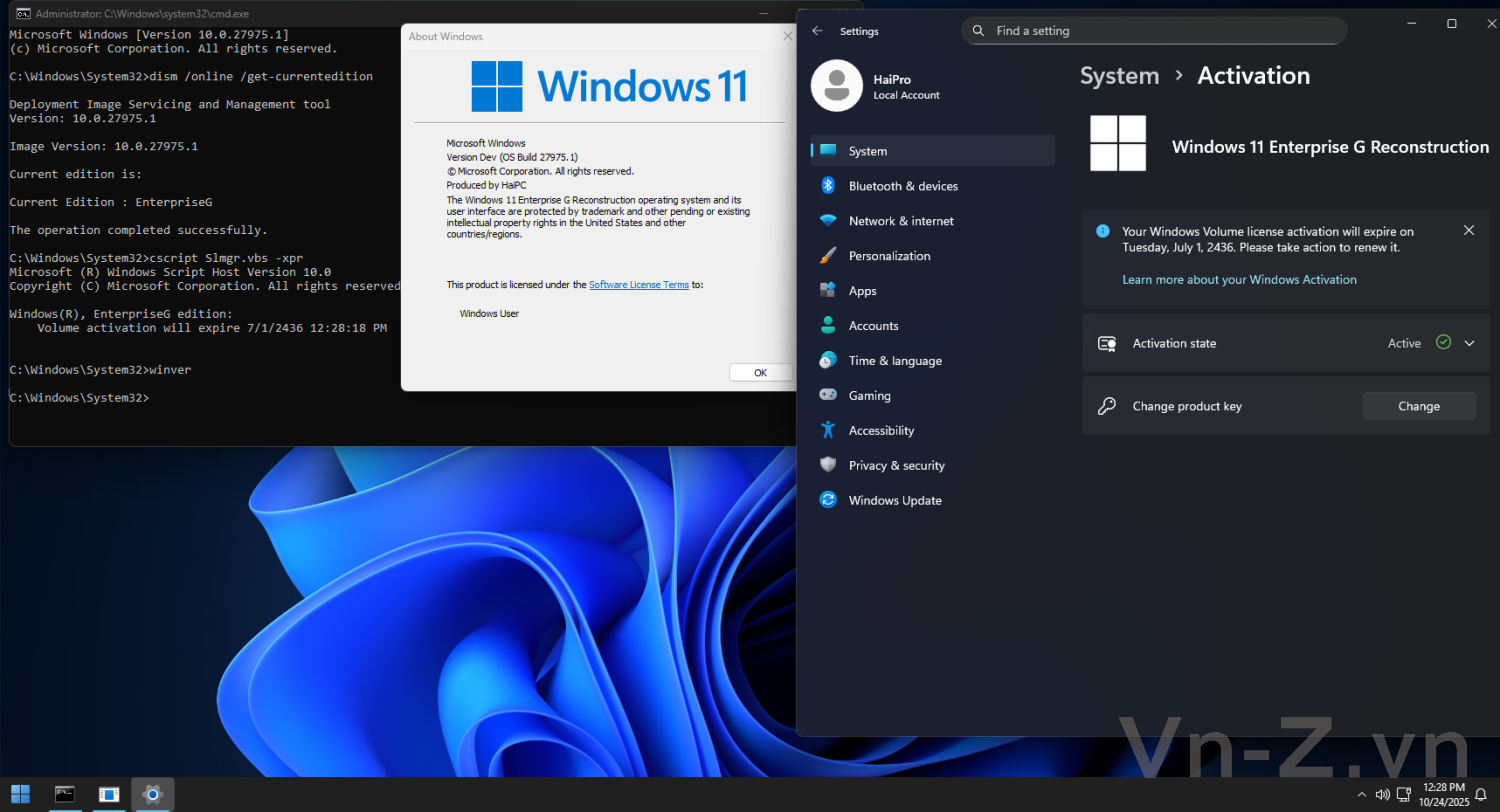
Sau vài lần bào chế từ món hàng @nho nguoi gửi > ra được phiên bản lai 27975.1 khá thú vị!
Mã:
F:\LTSC.vhd

Deployment Image Servicing and Management tool
Version: 10.0.26100.5074

Details for image : F:\LTSC.vhd

Index : 1
Name : <undefined>
Description : <undefined>
Size : 21,516,828,672 bytes
WIM Bootable : No
Architecture : x64
Hal : COMPUTER\Generic
Version : 10.0.27975
ServicePack Build : 984
ServicePack Level : 0
Edition : EnterpriseG
Installation : Client
ProductType : WinNT
ProductSuite : Terminal Server
System Root : Windows
Directories : <undefined>
Files : <undefined>
Created : 10/29/2025 - 6:18:55 PM
Modified : 10/29/2025 - 6:18:55 PM
Languages :
        en-US (Default)
The operation completed successfully.
active.jpg
 

nho nguoi

Rìu Chiến Bạc
Sau vài lần bào chế từ món hàng @nho nguoi gửi > ra được phiên bản lai 27975.1 khá thú vị!
Mã:
F:\LTSC.vhd

Deployment Image Servicing and Management tool
Version: 10.0.26100.5074

Details for image : F:\LTSC.vhd

Index : 1
Name : <undefined>
Description : <undefined>
Size : 21,516,828,672 bytes
WIM Bootable : No
Architecture : x64
Hal : COMPUTER\Generic
Version : 10.0.27975
ServicePack Build : 984
ServicePack Level : 0
Edition : EnterpriseG
Installation : Client
ProductType : WinNT
ProductSuite : Terminal Server
System Root : Windows
Directories : <undefined>
Files : <undefined>
Created : 10/29/2025 - 6:18:55 PM
Modified : 10/29/2025 - 6:18:55 PM
Languages :
        en-US (Default)
The operation completed successfully.
Xem phần đính kèm 69911
"lai" tây hay lai "á" bác ui :D
 

nho nguoi

Rìu Chiến Bạc
Tôi nhớ có bản nào đó rõ ràng vỏ 20348 thường nhưng lõi lại là server > có thể cập nhật! Bản trên có chút giống, cũng có thể cập nhật!
đúng là có bản như thế,rất hay nhưng thiên hạ lại không thích bản "Fake"
em sẽ đợi bản chính thức xem mcrs sẽ làm gì :D


Top